The Part Library is rolling out in beta and is enabled per team. Contact us to get access, then find Part Library in your team sidebar.
A Library for Your Team
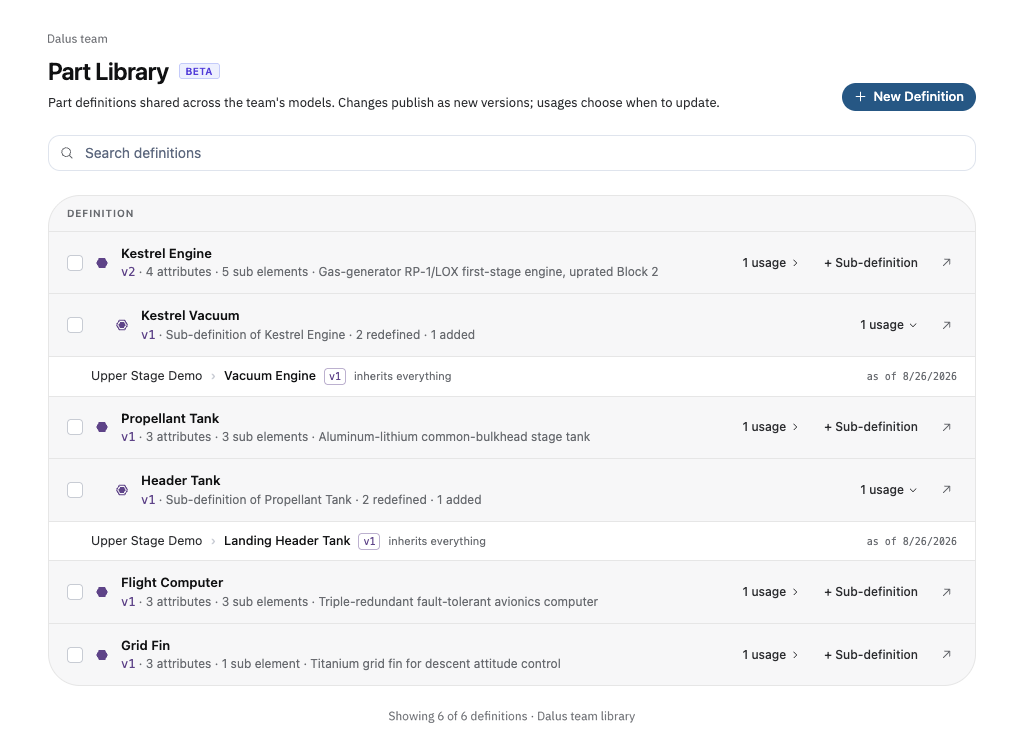
The Part Library page lists every definition your team has published: its current version, attributes, sub elements, and where it's used. Expand a definition's usages to jump straight to any linked part in any model. Save a part from the canvas with Save as Definition, or start from scratch with + New Definition.
The Definition Editor
Every definition opens in its own focused canvas editor: the same modeling tools, stripped down to just the part and its subtree. Edit freely; your draft is saved and shared with the team until you publish it with Save Version…. Usages stay on their current version and see an update indicator; nothing changes for them until they update.
Inherit from Library
Link any part to a definition from the part's menu with Inherit from Library…. The definition's values are stamped onto the part, which becomes a usage, marked on the canvas, in the model tree, and in the inspector, with a link back to its definition. Attributes the definition doesn't know about are kept as local attributes.
Overrides
Edit any inherited value on a usage and it becomes an override, marked with a dot and kept through updates. From the override panel, Reset Overrides returns to the definition's values, and Push Overrides… publishes your value back to the library as a new version for the rest of the team.
Opt-in Updates
When the library moves ahead of a usage, its version chip turns amber. Click it to review the update and apply it with Update to vN: non-overridden properties refresh, new elements are added, and your overrides are kept. A receipt spells out exactly what changed.
Sub-definitions
Create a variant of a base definition with + Sub-definition. It redefines just the attributes you choose and tracks the base for everything else. When the base publishes, sub-definitions follow, keeping their redefined values frozen. You can also promote a diverged usage with Save as Sub-definition, turning its overrides into a reusable variant.
